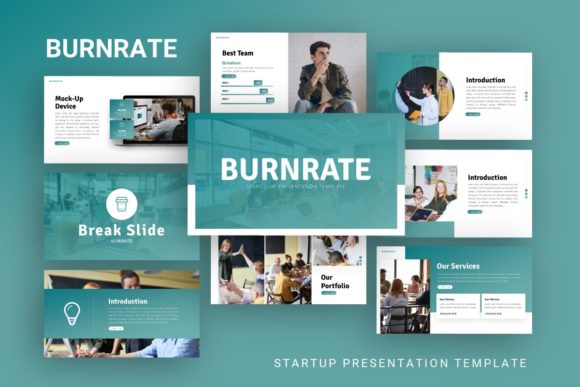
Presentation Template - Burnate: A Versatile Design Tool
Creating a compelling slide deck often feels like a balancing act between aesthetic appeal and clear communication. For professionals, entrepreneurs, and creatives, the visual structure of a presentation is just as important as the data it contains. This is where Presentation Template - Burnate serves as a practical solution. It is not merely a collection of pre-designed slides; it is a comprehensive framework designed to streamline the creation process for a wide array of users. Whether you are preparing a high-stakes pitch deck for investors or curating a personal photography portfolio, this template provides the structural foundation necessary to convey your message effectively without requiring advanced graphic design skills.
Understanding the Core Value and Flexibility
At its heart, Burnate is built on versatility. Many templates on the market are niche-specific, forcing users to adapt rigid layouts that do not quite fit their narrative. In contrast, this template is engineered for adaptability across multiple disciplines. It supports diverse use cases including creative agency profiles, corporate business reports, startup introductions, and individual portfolios. This broad applicability stems from a neutral yet modern design language that acts as a canvas rather than a constraint.
For a startup founder, the value lies in speed and professionalism. When introducing a new venture, time is often scarce. Having 35 distinct slides available means you can assemble a coherent story about your business model, market analysis, and team structure in hours rather than days. For a photographer or visual artist, the template offers clean layouts that prioritize imagery over text, ensuring the work remains the focal point. The ability to serve both corporate and creative needs makes it a sustainable asset that grows with your career or business evolution.
Key Features That Simplify the Design Process
The technical specifications of Presentation Template - Burnate are tailored to reduce friction during the editing phase. Understanding these features helps users maximize efficiency:
- Master Slide Architecture: The template is based on master slides, which is a critical feature for maintaining consistency. Instead of formatting individual slides one by one, users can adjust global elements like fonts, colors, and logo placement across the entire deck instantly. This ensures a polished, professional look even if multiple people are working on the same file.
- Handcrafted Infographics: Data visualization is often the most time-consuming part of presentation design. Burnate includes handcrafted infographics within PowerPoint that are fully editable. Rather than importing static images from external software, you can modify charts and diagrams directly in the slide editor to reflect your specific metrics.
- Pixel-Perfect and Resizable Graphics: Visual clarity matters, especially when presenting on large screens or high-resolution displays. All graphics are vector-based or high-resolution, meaning they remain sharp regardless of scaling. Every graphic element is resizable and editable, allowing for customization without pixelation.
- Drag-and-Drop Picture Placeholders: Replacing stock photos with your own content should be seamless. The template utilizes intuitive picture placeholders that allow for simple drag-and-drop functionality. This eliminates the need for complex cropping or masking tools, making it accessible for beginners who may not be familiar with advanced image editing.
Practical Applications Across Different Contexts
The true test of any design tool is how well it performs in real-world scenarios. Burnate’s structure supports various professional and personal objectives through its adaptable layout system.
Startup Pitch Decks and Investor Relations
When launching a new venture, clarity is currency. Investors review hundreds of decks, so standing out requires a balance of bold visuals and digestible information. The 35-slide library includes specific layouts tailored for problem-solution narratives, financial projections, and competitive landscapes. Because the infographics are native to PowerPoint, founders can quickly update traction numbers right before a meeting without worrying about broken links or formatting errors.
Creative Agency and Corporate Profiles
Agencies and established businesses need to communicate trust and capability. The template’s corporate layouts provide structured grids for showcasing case studies, client testimonials, and service offerings. Unlike generic business templates that feel sterile, Burnate incorporates modern typography and spacing that appeals to contemporary audiences while retaining professional gravity. This makes it suitable for annual reports, internal training sessions, or client acquisition presentations.
Personal Portfolios and Photography
Freelancers and artists often struggle to translate their visual work into a slide format. Standard corporate templates usually have too much text and not enough negative space. Burnate addresses this with minimalist layouts designed specifically for visual storytelling. Photographers can create immersive galleries, while designers can showcase UI/UX projects with ample room for annotations and context. The flexibility allows a personal brand to shine without being overshadowed by heavy design elements.
What Is Included in the Package
Before downloading or purchasing, it is helpful to know exactly what files and resources are provided to ensure compatibility with your workflow:
- PowerPoint .PPTX File: The primary deliverable is a standard PowerPoint file compatible with modern versions of Microsoft Office. This ensures accessibility for most business and educational environments.
- Documentation File: A guide is included to assist with setup and customization. This is particularly valuable for beginners who may need instructions on utilizing master slides or editing vector icons.
- Vector Icon Set: Access to a library of vector icons allows for consistent visual metaphors throughout the presentation. These can be recolored to match your brand identity effortlessly.
Important Considerations Before You Begin
While Presentation Template - Burnate is a powerful resource, setting realistic expectations ensures a smooth experience. One crucial note for all users is that all images shown in the demo are for preview purposes only and are not included in the downloadable files. This is standard industry practice due to licensing restrictions, but it means you must have your own photography or stock assets ready to populate the placeholders.
Additionally, consider your software version. While .PPTX files are widely supported, some advanced animations or specific font renderings may vary between older desktop versions and cloud-based platforms like PowerPoint Online or Keynote. Testing the file in your primary presentation environment before a major deadline is always a best practice.
Finally, remember that a template is a starting point, not a finished product. The 35 slides provide options, but effective communication requires curation. Resist the urge to use every slide simply because it is available. Select the layouts that best support your specific narrative arc. Use the master slide features to align the color palette with your brand guidelines immediately upon opening the file. By treating Burnate as a flexible toolkit rather than a rigid script, you can produce presentations that feel bespoke, professional, and authentically yours.