Evaluating Presentation Template - Creativate for Professional Use
In the landscape of digital communication, the efficiency of visual storytelling often dictates the success of a pitch or corporate update. For professionals managing tight deadlines, building a slide deck from scratch is rarely a viable option. This is where specialized assets like Presentation Template - Creativate enter the workflow. Rather than serving as a generic backdrop, this template system is engineered to bridge the gap between high-end agency aesthetics and practical business utility. It targets a specific need: providing a comprehensive, editable framework that maintains design integrity while allowing for rapid content customization across diverse industries.
Creativate distinguishes itself through versatility. While many templates are niche-specific, this asset is structured to accommodate a wide spectrum of use cases, including creative agencies, company profiles, startup pitch decks, photography portfolios, and personal branding. The value proposition lies not just in the visual style, but in the underlying architecture that supports these varied applications without requiring advanced graphic design skills.
Structural Capabilities and Slide Volume
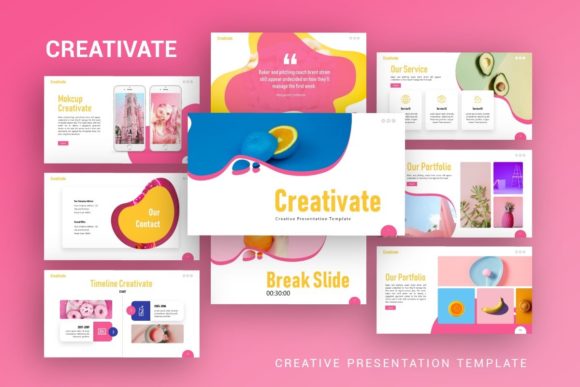
A primary metric for evaluating any presentation asset is the depth of its library. Presentation Template - Creativate includes 35 unique slides per template variation. In professional practice, this volume is significant. It moves beyond basic title and content layouts to offer specialized slides for data visualization, team introductions, service breakdowns, and portfolio showcases.
This breadth allows users to construct a complete narrative arc without hitting a creative wall midway through the drafting process. For a startup founder preparing a seed round pitch deck, having pre-designed slides for market analysis, financial projections, and problem-solution frameworks reduces cognitive load. Similarly, a photographer can utilize dedicated image-heavy layouts that respect aspect ratios and negative space. The 35-slide count strikes a balance between offering sufficient variety and avoiding the bloat that often makes larger templates unwieldy and slow to navigate.
Technical Architecture and Customization Workflow
The true test of a PowerPoint template is how it behaves when the user deviates from the demo content. Creativate is built on Master Slides, which is a critical technical distinction. Templates lacking proper master slide architecture force users to format individual elements on every page, leading to inconsistency and wasted time. By utilizing masters, this template ensures that global changes—such as updating a brand color palette, changing fonts, or adjusting logo placement—propagate instantly across the entire deck.
Furthermore, the inclusion of handcrafted infographics addresses a common pain point in business presentations. Generic charts often look disconnected from the overall design language. In this template, the infographics are native to the environment. They are fully resizable and editable vectors rather than static images. This means a marketer can adjust data points directly within the software without needing external tools like Adobe Illustrator. The pixel-perfect illustrations maintain clarity even when projected on large screens or viewed on high-density displays, ensuring professional output regardless of the viewing medium.
The drag-and-drop picture placeholder system further streamlines the workflow. Users can replace preview imagery with their own assets without manually cropping or masking. This feature is particularly valuable for non-designers who may struggle with alignment and composition, as the placeholders enforce consistent visual boundaries.
Practical Applications Across Industries
The adaptability of Presentation Template - Creativate makes it relevant for several distinct professional demographics. Understanding how it performs in specific contexts helps determine its fit for your current project.
- Creative Agencies and Studios: For agencies, the template serves as a portfolio vessel. The clean typography and grid-based layouts allow work samples to take center stage without competing with decorative elements. It supports the "show, don't tell" philosophy essential in creative pitching.
- Startups and Entrepreneurs: Investor decks require a specific flow. Creativate provides the structural scaffolding for this narrative. The ability to quickly swap in custom icons and adjust infographic data allows founders to iterate their deck based on feedback without redesigning slides from zero.
- Corporate and Business Profiles: Internal reporting and B2B sales presentations benefit from the template’s professional tone. The consistency enforced by the master slides helps maintain brand compliance across departments, reducing the risk of off-brand communications.
- Freelancers and Personal Portfolios: Individual creators often lack the budget for custom design. This template offers an agency-level aesthetic at a fraction of the cost, allowing freelancers to present their services and case studies with authority.
Asset Management and File Deliverables
When acquiring digital assets, understanding exactly what is included prevents workflow friction later. The Creativate package delivers a .PPTX file, which ensures compatibility with modern versions of Microsoft PowerPoint. Crucially, it also includes vector icons and a documentation file.
The documentation is often overlooked but is vital for maximizing ROI. It guides users through the specifics of editing master slides and manipulating the custom infographics. Without this guide, users might attempt to edit complex grouped objects inefficiently. The included vector icon set adds another layer of value, eliminating the need to source or purchase separate icon packs to match the template’s visual style.
It is important to note a standard industry limitation: all images shown in the preview are for demonstration purposes only and are not included in the downloadable files. Users must supply their own photography. While this requires additional effort, it is actually preferable for professional use, as stock photos from templates often appear dated or irrelevant to specific business contexts. Sourcing original or licensed imagery ensures the final presentation remains authentic and legally compliant.
Assessing Quality and Long-Term Value
From a quality assurance perspective, Presentation Template - Creativate demonstrates attention to detail that separates premium assets from free alternatives. The alignment is precise, the color harmonies are tested, and the typography hierarchy is logical. These subtle factors contribute to the perceived professionalism of the final output. A misaligned text box or inconsistent font weight can subconsciously undermine a presenter's credibility; this template mitigates those risks through rigorous construction.
Regarding long-term value, the template’s reliance on standard PowerPoint features rather than obscure plugins or macros enhances its longevity. Files remain accessible and editable years down the line, regardless of software updates. The modular nature of the slides also means they can be repurposed. A slide designed for a quarterly report today can be adapted for a webinar next year, extending the asset's utility beyond a single project.
Considerations and Limitations
While highly capable, no template is a universal solution. Prospective users should consider a few practical limitations. First, the learning curve for Master Slides can be steep for beginners accustomed to direct editing. Users unfamiliar with this feature may initially find the template restrictive until they consult the documentation. Investing time in understanding the master slide structure is necessary to unlock the template's full efficiency.
Second, because the template is designed for broad appeal, some niche industries may find certain slides less relevant. A medical researcher or an industrial engineer might need to heavily modify specific layouts to suit technical requirements. The template provides the foundation, but domain-specific adaptation still requires user input.
Finally, the requirement to source external imagery means the final quality is partially dependent on the user’s access to good photography. If high-quality visuals are unavailable, the template’s minimalist aesthetic could feel sparse. Users should assess their asset library before committing to ensure they can populate the placeholders effectively.
Determining Fit for Your Workflow
Presentation Template - Creativate represents a pragmatic investment for professionals who prioritize speed without sacrificing aesthetic standards. It is best suited for users who understand that a template is a starting point, not a finished product. If your goal is to establish a consistent visual identity across multiple presentations, or if you frequently create decks for different clients and need a reliable base structure, this asset aligns well with those objectives.
For those evaluating this resource, consider your current bottleneck. If design inconsistency or slow production times are hindering your communication strategy, the structured flexibility of Creativate offers a tangible solution. However, if you require highly specialized technical diagrams or have zero willingness to learn master slide editing, you may need to seek alternative resources or hire a dedicated designer. Ultimately, this template serves as a powerful accelerator for competent users ready to leverage professional-grade tools to enhance their visual storytelling.