Presentation Template - Oslok: A Creative Design Guide
Creating a visually stunning presentation often feels like a balancing act between compelling storytelling and professional design. For many professionals, entrepreneurs, and creatives, the challenge isn't the content itself but finding a layout that communicates ideas effectively without requiring hours of graphic design work. This is where Presentation Template - Oslok serves as a practical solution. It is more than just a collection of slides; it is a comprehensive design system built to streamline the creation process for a wide variety of users, from startup founders pitching investors to photographers showcasing their latest portfolio.
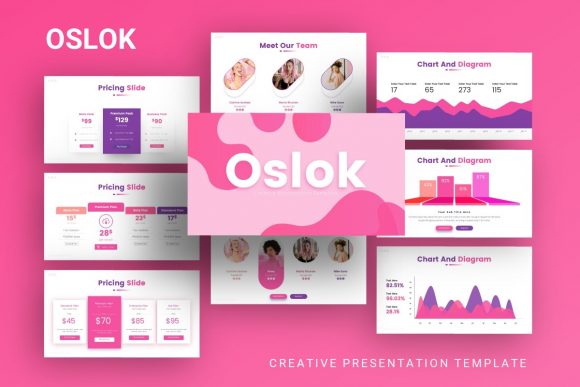
At its core, this template provides a structured yet flexible foundation for visual communication. Instead of starting with a blank white canvas, users gain access to thirty-five distinct slides that have been professionally crafted to work together harmoniously. The design language is modern and clean, making it suitable for contexts ranging from corporate business profiles to artistic personal portfolios. By utilizing pre-designed master slides, you ensure consistency across your entire deck, which is crucial for maintaining brand identity and keeping your audience engaged.
Versatile Applications for Modern Professionals
One of the strongest attributes of Oslok is its adaptability. While some templates are rigidly designed for a single industry, this creative presentation framework supports multiple use cases through intelligent layout variations. Understanding how to apply these layouts to your specific needs can significantly reduce production time.
- Creative Agencies and Portfolios: Visual-heavy industries require layouts that let images breathe. The template includes dedicated photography and portfolio slides where picture placeholders allow for simple drag-and-drop functionality. This makes it ideal for agencies presenting case studies or freelancers displaying their best work.
- Startup Pitch Decks: When seeking funding or partnerships, clarity is paramount. The included handcrafted infographics help simplify complex data, market analysis, and business models into digestible visuals. Investors appreciate decks that look polished and professional, as it signals attention to detail.
- Corporate and Business Profiles: Established companies need a reliable template for internal reporting, client introductions, and team onboarding. The corporate-friendly slides maintain a professional tone while avoiding the stale aesthetic of default office software themes.
- Personal Branding: Job seekers and consultants can utilize the personal portfolio sections to create digital resumes or capability statements that stand out in a crowded market.
Streamlining Workflow with Master Slides
For beginners and non-designers, the concept of "Master Slides" might sound technical, but it is actually the feature that saves the most time. In Presentation Template - Oslok, global elements like fonts, colors, and logo placements are controlled at the master level. This means if you decide to change your brand color from blue to green, you can update it once in the master slide, and the change will automatically propagate across all thirty-five slides. This eliminates the tedious task of formatting individual pages and prevents inconsistent styling errors that often plague amateur presentations.
Furthermore, the graphics within the template are fully resizable and editable vector illustrations. Unlike raster images that become pixelated when stretched, these vectors maintain crisp edges at any size. Whether you are projecting onto a massive conference screen or sharing a PDF via email, the visual integrity remains intact. This pixel-perfect quality ensures that your hard work looks professional regardless of the viewing medium.
Customization Without Compromise
A common concern when downloading pre-made assets is the fear of looking generic. However, Oslok is engineered for deep customization. The easy-to-customize contents mean that text boxes, shapes, and image frames are unlocked and accessible. You are not forced to keep placeholder text or stock imagery. The drag-and-drop picture placeholders are particularly useful for those who want to swap demo images for their own assets instantly without wrestling with cropping tools or alignment guides.
The inclusion of vector icons adds another layer of flexibility. Icons are essential for breaking up walls of text and guiding the viewer’s eye through a narrative. Because they are vector-based, you can recolor them to match your specific brand palette effortlessly. This level of control allows you to take a template and make it feel entirely bespoke, ensuring your audience focuses on your message rather than recognizing a stock design.
Important Considerations Before You Begin
While Presentation Template - Oslok offers significant advantages, there are practical details to consider to ensure a smooth experience. First and foremost, it is vital to understand licensing and asset inclusion. As noted in the product documentation, all images shown in the preview demos are for display purposes only and are not included in the downloadable files. You must be prepared to supply your own high-quality photography and media. Using low-resolution or irrelevant images can undermine the premium feel of the template, so plan your visual assets before you begin editing.
Additionally, review the included documentation file thoroughly. Even intuitive templates have specific workflows or font requirements. The documentation acts as your user manual, explaining how to edit infographics, manage master slides, and install necessary fonts. Skipping this step is the most common reason users struggle with customization. Taking ten minutes to read the guide can save hours of frustration later.
File compatibility is another factor. The package includes a PowerPoint .PPTX file, which is the industry standard. However, if you primarily use Keynote or Google Slides, be aware that some advanced animations or master slide linkages may behave differently upon conversion. Always test your presentation on the actual equipment you intend to use for delivery to catch any formatting shifts beforehand.
Maximizing Impact Through Visual Storytelling
Owning a high-quality template is only half the battle; using it effectively requires strategic thinking. When working with the thirty-five available slides, resist the urge to use every single one. Select only the layouts that serve your narrative arc. A concise, well-paced presentation is always superior to a lengthy, repetitive one. Use the handcrafted infographics to highlight key statistics or processes, but pair them with verbal explanations rather than reading directly from the slide.
Remember that whitespace is an active design element. The Oslok aesthetic relies on balanced spacing to create a sense of sophistication. Avoid cluttering slides with excessive text or too many competing visuals. If a slide feels crowded, split the content across two slides or move detailed information to a handout. The goal is to support your speech, not replace it.
Ultimately, Presentation Template - Oslok represents a smart investment in your professional communication toolkit. It bridges the gap between DIY design and hiring an expensive agency, empowering users to produce agency-quality work independently. By leveraging its robust features—from editable vectors to master slide efficiency—you can focus less on pixel-pushing and more on crafting a persuasive, memorable message that resonates with your audience. Whether you are launching a new product, applying for a dream job, or reporting quarterly results, having a reliable, beautiful foundation makes the entire process smoother and more effective.