Presentation Template - Budget: A Practical Tool for Financial Storytelling
Money talks, but in a professional setting, it needs to speak clearly. The Presentation Template - Budget is designed specifically to bridge the gap between complex financial data and audience comprehension. Unlike generic slide decks that force you to shoehorn numbers into ill-fitting layouts, this template provides a structured narrative framework for discussing finances, resource allocation, and fiscal planning. It serves as a visual translator, turning spreadsheets into compelling stories that stakeholders can actually understand and act upon.
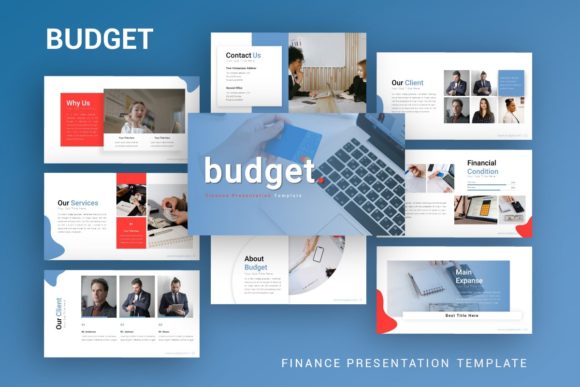
At its core, this resource is more than just a collection of slides; it is a communication strategy packaged in a .PPTX file. With 35 distinct slides based on master layouts, it offers enough variety to cover quarterly reviews, annual forecasts, grant proposals, or personal financial plans without feeling repetitive. The inclusion of handcrafted infographics and pixel-perfect illustrations means you are not starting from scratch when trying to visualize profit margins or expense breakdowns. Instead, you are working with a system built to make financial presentations look polished and professional, regardless of your design skills.
When Financial Clarity Matters Most
The true value of the Presentation Template - Budget emerges in high-stakes environments where confusion is not an option. Consider the startup founder preparing for a Series A pitch. Investors do not want to see raw Excel exports; they want to see burn rates, runway projections, and unit economics presented with confidence. Using a dedicated budget template signals that the founder understands the importance of financial discipline. The pre-designed infographic slides allow the entrepreneur to highlight key metrics visually, ensuring the investor’s eye is drawn exactly where it needs to go rather than getting lost in a wall of text.
This utility extends well beyond venture capital. Small business owners often face the daunting task of presenting annual budgets to boards or partners who may not have accounting backgrounds. In these scenarios, the template acts as a guide. The drag-and-drop picture placeholders and resizable graphics allow the owner to customize the deck to reflect their specific industry while maintaining a cohesive visual identity. When discussing sensitive topics like cost-cutting measures or reallocation of funds, having a clean, neutral, and professional design helps keep the conversation focused on facts rather than emotions.
Creative Agencies and Freelancers
Creatives often struggle to present financial information without compromising their aesthetic standards. For a creative agency pitching a marketing budget to a client, the presentation itself is a testament to the agency's attention to detail. The Presentation Template - Budget allows designers and marketers to maintain their brand voice even when discussing line items. Because all graphics are editable and vector-based, a designer can adjust colors and typography to match client branding instantly. This seamless integration ensures that the budget proposal feels like a natural extension of the creative work being pitched, rather than an administrative afterthought.
Freelancers and consultants also benefit significantly. When proposing a project fee structure or a retainer model, clarity builds trust. A messy quote can suggest disorganization, while a polished financial presentation suggests reliability. By using this template, independent professionals can create standardized pitch decks that save time on future proposals. The documentation file included with the download makes it easy to remember how to edit specific elements, reducing the learning curve and allowing freelancers to spend more time on billable work and less time formatting slides.
Educational and Personal Applications
Financial literacy is a critical life skill, yet it is rarely taught with engaging visuals. Educators and trainers can utilize this template to teach budgeting concepts to students or workshop participants. Abstract concepts like compound interest, debt-to-income ratios, or savings goals become tangible when represented through high-quality infographics. Teachers can modify the content to suit different age groups or learning levels, using the 35 slides as a modular curriculum. The ability to resize and edit all graphic elements means educators can simplify complex charts for younger audiences or add granular detail for advanced finance courses.
On a personal level, individuals managing household finances, planning weddings, or organizing community fundraisers can leverage this tool to bring order to chaos. While it might seem excessive to use a corporate-grade template for a personal portfolio or family budget, the structure it provides is invaluable. It forces the user to categorize expenses logically and present them coherently. For someone documenting their financial independence journey on a blog or social media, these slides provide ready-made assets that look authoritative and trustworthy. The template transforms personal data into shareable, educational content that can inspire others.
Corporate Reporting and Internal Communication
Within larger organizations, department heads frequently need to justify spending or report on ROI to non-financial leadership. The Presentation Template - Budget facilitates cross-departmental communication by standardizing how financial data is displayed. When marketing, operations, and HR all use consistent visual language for their budget updates, executive teams can compare performance more effectively. The master slide functionality ensures that even if multiple people contribute to a single deck, the formatting remains consistent. This reduces the friction of compiling end-of-year reports and allows leadership to focus on strategic decisions rather than deciphering inconsistent charts.
Practical Considerations Before You Download
Before integrating this template into your workflow, it is important to manage expectations regarding the assets. As noted in the product details, all images in the demo are for preview purposes only and are not included in the final files. This is standard practice, but it means you must have your own photography or stock image subscriptions ready. The template provides the structure and the vector icons, but the emotional resonance often comes from authentic imagery. Plan to source photos that align with your specific narrative, whether that is office environments, product shots, or lifestyle imagery for personal portfolios.
You should also assess your comfort level with PowerPoint’s master slide features. While the template is marketed as easy to customize, getting the most out of it requires understanding how global changes affect individual slides. The included documentation file is a critical resource here. Users who take ten minutes to read the guide will save hours of frustration later. If you are new to presentation design, start by duplicating existing slides and swapping content before attempting to build new layouts from scratch. This approach preserves the integrity of the design system while allowing for gradual customization.
Consider the specific nature of your data before choosing your slides. With 35 options available, there is a risk of including too much information. Just because a slide exists does not mean it belongs in your deck. Select only the layouts that directly support your key messages. A budget presentation should be lean and purposeful. Use the handcrafted infographics to summarize trends, but rely on simple tables for precise figures. The goal is to enhance understanding, not to showcase every feature of the template. Effective use of white space and the provided vector icons can make dense financial data feel approachable and digestible.
Finally, think about long-term reusability. One of the greatest advantages of the Presentation Template - Budget is its potential to become a permanent asset in your digital toolkit. After your first use, save a cleaned-up version as your own master template. Remove specific data but keep the customized color schemes, logo placements, and preferred slide selections. This creates a bespoke financial presentation system tailored to your unique needs. Over time, this efficiency compounds, allowing you to produce high-quality financial narratives in a fraction of the time it would take to build them from a blank canvas. Whether you are a startup founder seeking funding or a teacher explaining savings, treating this template as a foundational tool rather than a disposable fix will yield the best return on investment.