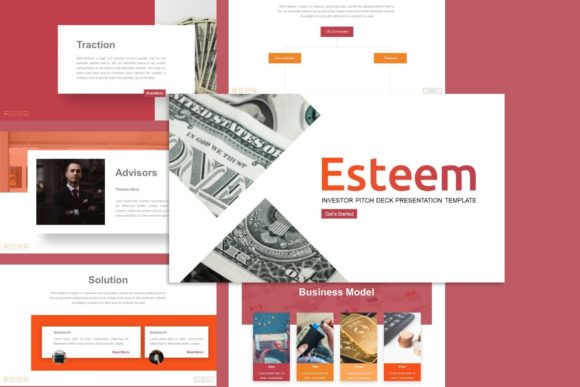
Esteem Investor Presentation Template: A Practical Guide to Professional Pitch Decks
Securing funding, winning a new client, or showcasing a personal portfolio often hinges on the clarity and visual appeal of your slide deck. The Esteem Investor Presentation Template has emerged as a versatile solution for professionals who need high-quality visuals without hiring an expensive design agency. Whether you are preparing a pitch deck for a startup, updating a corporate company profile, or displaying photography in a creative portfolio, this template offers a structured foundation. However, owning a premium template is only the first step. Many users download these assets with high expectations but fail to leverage their full potential due to common workflow errors and misunderstandings about how professional presentation files function.
Understanding the Versatility Beyond Investment Pitches
A frequent misconception is that the Esteem Investor Presentation Template is strictly for venture capital meetings. While it excels in that arena, limiting its use to financial pitches overlooks its broader utility. The design architecture supports a wide variety of purposes, including creative agency showcases, educational lectures, freelancer portfolios, and small business marketing materials. When users pigeonhole this tool as solely an "investor" asset, they miss opportunities to maintain brand consistency across different types of communication.
For example, a freelance photographer might assume they need a separate gallery-specific template. In reality, the clean layouts and picture placeholders within Esteem are optimized for visual storytelling just as much as data visualization. By recognizing this versatility early, you can standardize your visual identity across multiple projects rather than juggling disparate design styles. This cohesion builds trust with your audience, whether they are evaluating your ROI or your artistic composition.
The Master Slide Mistake: Why Direct Editing Fails
The most significant technical error beginners make when using the Esteem Investor Presentation Template is editing individual slides directly instead of utilizing the Master Slides. This template includes 35 unique slides based on a robust master slide system. When you manually change fonts, colors, or logo placement on a single slide, you break the global link. This leads to inconsistent branding, wasted hours fixing formatting slide-by-slide, and a final product that looks unprofessional despite starting with a premium asset.
To avoid this, always navigate to View > Slide Master in PowerPoint before making global changes. Adjusting your color palette or typography here ensures that every one of the 35 slides updates automatically. This approach not only saves time but also preserves the pixel-perfect integrity of the original design. If you find yourself constantly overriding styles on individual pages, it is a sign that you should be working at the master level. Respecting the underlying structure is what separates a polished corporate presentation from a disjointed slideshow.
Misunderstanding Graphic Customization and Infographics
Another area where efficiency drops is in the handling of handcrafted infographics. Users often treat these complex vector elements as static images, either leaving them unchanged because they seem too difficult to edit or deleting them entirely to replace with simple text. Both approaches diminish the value of the template. The handcrafted infographics included in Esteem are fully resizable and editable vectors, not flattened JPEGs.
If you leave the demo data in a chart or graph, your audience will immediately recognize it as a generic template, which undermines your credibility. Conversely, replacing a sophisticated infographic with a bullet list reduces engagement. Take the time to ungroup elements carefully and update the data points to reflect your actual metrics. Because these graphics are vector-based, they remain crisp at any size. Learning to manipulate these specific assets transforms the template from a pretty backdrop into a powerful communication tool tailored to your narrative.
The Image Placeholder Trap
Visuals drive engagement, yet many presenters struggle with image integration. A common frustration arises when users try to insert photos by simply pasting them onto the slide, covering up design elements and disrupting alignment. The Esteem Investor Presentation Template utilizes smart picture placeholders designed for drag-and-drop functionality. Ignoring this feature results in cropped heads, stretched aspect ratios, and messy layouts.
Always click the center icon within the placeholder frame to insert your media. This ensures the image masks correctly within the intended shape and maintains the designer’s original composition. Furthermore, remember that all images shown in the preview demo are for display purposes only and are not included in the downloadable files. Beginners sometimes panic when opening the file and seeing generic stock photos or empty frames. Prepare your own high-resolution assets beforehand so you can populate the placeholders immediately upon opening the file. Having your media organized in a dedicated folder streamlines this process significantly.
Evaluating File Compatibility and Documentation
Before committing to the Esteem Investor Presentation Template, verify your software environment. While the .PPTX format is industry-standard, older versions of PowerPoint or certain web-based editors may not support advanced animations or vector editing features. Using incompatible software can corrupt the master slide links or render infographics uneditable. Always check the documentation file included with your download. This file is not merely a receipt; it contains critical instructions on font installation, color codes, and troubleshooting specific to this template.
Skipping the documentation is a preventable mistake that leads to unnecessary support tickets and project delays. For instance, if the template uses a specific free font that isn't installed on your system, PowerPoint will substitute it with a default typeface, ruining the spacing and hierarchy. Installing the recommended fonts takes less than two minutes but ensures the design renders exactly as intended. Treat the documentation as part of the setup process, not an afterthought.
Balancing Content Density with Design
Having 35 slides available does not mean you should use all of them. A pervasive error is feeling obligated to fill every layout option provided by the Esteem Investor Presentation Template. This results in bloated decks that lose focus and exhaust the audience. The abundance of slides is meant to offer choice, not a checklist. Select only the layouts that genuinely support your key messages.
For a startup pitch, you might only need 10 to 12 slides covering the problem, solution, market, and team. For a comprehensive company profile, you might utilize 20. The unused slides are there as backups or alternatives, not requirements. Prioritize narrative flow over feature utilization. A concise, well-edited deck using five perfect slides is infinitely more effective than a 35-slide marathon where half the content is filler. Use the template’s structure to enhance your story, not dictate its length.
Making an Informed Decision
When evaluating whether the Esteem Investor Presentation Template is right for your needs, look beyond the aesthetic preview. Consider your own proficiency with PowerPoint’s master slide and vector editing tools. If you are a complete beginner, factor in the learning curve required to customize handcrafted infographics properly. The template is user-friendly, but it rewards those who invest time in understanding its mechanics.
Also, assess the alignment between the template’s style and your brand voice. Esteem offers a modern, clean aesthetic suitable for corporate and creative contexts alike. However, if your brand requires a grunge, retro, or highly ornate style, forcing this minimalist template to fit could require more work than starting from scratch. Match the tool to the task. When used correctly with attention to master slides, proper image handling, and strategic slide selection, this template serves as a professional accelerator. It bridges the gap between DIY efforts and agency-quality design, provided you approach it with intentionality and respect for its built-in systems.